
Technology
How accurate are AI-generated game mechanics


The adoption of generative AI in creative fields has moved at a breakneck speed. Artists use it for concept art, writers use it for lore, and voice actors are facing a new wave of synthetic competitors. But for game developers, the holy grail has always been the mechanics themselves. The rules, the systems, and the interactions that define play are the heart of any project.
This raises a critical question for the industry. Can AI actually design a fun game? Or does it simply write code that technically runs but fails to engage the player?
While AI generated game mechanics are becoming a popular experiment for developers, the reality is nuanced. AI is an incredibly powerful tool for rapid prototyping and brainstorming. However, when it comes to the accuracy of design, specifically the delicate balance of “fun”, current models often fall short. They produce mechanics that are technically functional but often derivative or practically flawed without significant human intervention.
How AI Generates Mechanics
To understand the accuracy of these tools, we first need to look at how they operate. When we talk about AI in game design today, we are primarily discussing Large Language Models (LLMs) like ChatGPT, Claude, and coding assistants like GitHub Copilot.
These models do not “play” games. They do not understand the sensation of a perfectly timed jump or the satisfaction of a critical hit. Instead, they predict the next likely token in a sequence of text or code based on vast datasets of existing code repositories and design documents.
There is a distinct difference between generating narrative flavor text and generating hard logic. If you ask an AI to write a backstory for a goblin, it has millions of fantasy tropes to pull from. The “accuracy” there is subjective. But if you ask it to write a C# script for a Unity character controller, the accuracy is objective. It either works, or it throws a compiler error.
The Accuracy Test: Does it Compile vs Is it Fun?
Tic Tac Toe is the perfect example of a mechanically accurate game that is deterministic and bug-free but limited in depth. It reinforces your argument about correctness not guaranteeing engagement.
When evaluating AI-generated game mechanics, we need to split “accuracy” into two categories:
Technical Accuracy
On a technical level, modern coding assistants are surprisingly competent at standard tasks. If you need a script for a double jump, a health bar UI, or a basic inventory system, AI can generate this in seconds. For boilerplate code, the accuracy is high.
However, complexity breeds chaos. As soon as you ask for a mechanic that requires multiple scripts to talk to one another, the accuracy drops. The AI might write a player script that references a GameManager that doesn’t exist, or it might try to access a private variable from another class.
Design Accuracy
This is where the cracks truly begin to show. A mechanic can be bug-free and still be “inaccurate” in the context of good game design.
For example, you might ask an AI to design a “high-risk, high-reward combat mechanic.” The AI might suggest: “The player deals 500% damage but dies in one hit.”
Technically, that is high risk and high reward. Practically, it is likely unplayable in most genres. It ignores context. Is this a roguelike? A competitive shooter? An RPG? The AI lacks the holistic understanding of the game loop. It provides a mathematical solution to a design problem without understanding the player psychology behind it.
The Hallucination Problem
One of the most frustrating aspects of using AI in game design is the hallucination of API calls. This occurs when the AI confidently invents functions or libraries that do not exist within the game engine.
Imagine asking an AI to write a script for realistic buoyancy in Unity. The AI might provide a beautifully commented script using a function called Rigidbody.CalculateWaterDisplacement(). It looks perfect. It reads logically. But when you paste it into your IDE, it lights up with red errors because that function is a complete fabrication.
This forces the developer into a debugging loop where they are fixing code for a feature that the AI pretended to know. In these instances, writing the mechanic from scratch would often be faster.
The Balance Problem
Game balance is more art than science. It requires an intuitive understanding of “player feel” and feedback. AI struggles immensely here because it cannot feel.
If you ask an AI to balance an economy system for an RPG, it will usually resort to linear progression. It might suggest that a Level 1 sword costs 10 gold and does 10 damage, while a Level 10 sword costs 100 gold and does 100 damage.
While mathematically accurate, this is a boring design. It fails to account for:
● Power Spikes: The excitement of getting a powerful item early.
● Diminishing Returns: The need to make upgrades feel significant at high levels.
● Player Skill: How a skilled player might break the economy.
AI-generated game mechanics often lack the “juice” that makes a game satisfying. They provide the skeleton of a system but miss the connective tissue that makes it fun to interact with.
Case Studies: Raw vs. Refined
Let’s look at a practical example of a dash mechanic to see the difference between raw AI output and what a human developer needs to do to make it work.
The Request
“Write a Unity C# script for a player dash mechanic with a cooldown.”
Raw AI Output (The Logic)
The AI will typically produce code that adds a sudden burst of force to the player’s Rigidbody.
// Simplified AI Output
void Dash() {
rb.AddForce(transform.forward * dashSpeed, ForceMode.Impulse);
}
The Result: The player teleports forward instantly. If they dash into a wall, they might clip through it. If they dash while in the air, gravity might act strangely. It is technically a dash, but it feels rigid and unpolished.
Human Corrected Output (The Game Feel)
A human designer knows that a dash needs “polish” to feel good. They would modify the AI’s base code to include:
● Input Buffering: So the dash comes out even if the button was pressed a millisecond too early.
● Invincibility Frames: Giving the player a moment of safety.
● Visual Feedback: adding a particle effect or screen shake.
● Momentum Conservation: Ensuring the dash transitions smoothly back into running.
The AI provided the physics calculation. The human provided the game design.
The Verdict: Copilot, Not Captain
So, how accurate are AI generated game mechanics?
They are accurate enough to get you started, but rarely accurate enough to ship. The current technology acts best as a “force multiplier” for experienced developers. It can clear the blank page syndrome. It can suggest five different ways to implement a crafting system, four of which might be bad, but one might spark a brilliant idea.
For junior developers, there is a risk. Relying too heavily on AI to generate mechanics can stunt the learning process. If you don’t understand why the code works, you won’t be able to fix it when the AI inevitably hallucinates a solution or creates a game-breaking bug.
The Future of AI in Game Design
We are still in the early days of generative AI for games. As models are trained specifically on game engine documentation and high-quality source code, the hallucinations will decrease. We may see a future where AI can playtest scenarios, running thousands of simulations to find the perfect damage values for that Level 10 sword.
Prompt-based game generation Platforms show how simple well defined mechanics can remain reliable when experimentation is kept within clear system boundaries.
Until then, treat AI as a junior designer on your team. It is enthusiastic and fast, but it needs a senior lead to review its work, correct its mistakes, and tell it when its ideas are boring. The future of game design isn’t about AI replacing developers. It is about developers who know how to wield AI, replacing those who don’t.

Introduction to NeuronPostShop.com and the benefits of using a modern e-commerce platform
Welcome to the world of NeuronPostShop.com, where e-commerce reaches new heights. If you’ve ever dreamed of starting your own online store or expanding an existing one, this platform is designed with you in mind. With its user-friendly interface and a range of powerful tools at your fingertips, navigating the complexities of online selling has never been easier.
Imagine showcasing your products to a global audience, all while managing everything from inventory to customer interactions seamlessly. This modern e-commerce solution offers not just convenience but also numerous benefits tailored for today’s sellers. Whether you’re an experienced entrepreneur or just stepping into the digital marketplace, NeuronPostShop.com equips you with what you need to succeed in today’s competitive landscape.
Ready to dive in and explore how you can thrive on this innovative platform? Let’s get started!
Setting up an account on NeuronPostShop.com
Getting started on NeuronPostShop.com is a breeze. First, head over to the homepage and locate the sign-up button. A simple click will direct you to the registration form.
Fill in your details such as name, email, and password. Make sure to use a secure password for added protection of your account.
Once you’ve filled out all necessary fields, hit that “Create Account” button. You might receive a confirmation email shortly after; just follow the link provided to verify your account.
After verification, log back in and explore the dashboard. It’s intuitive and user-friendly—perfect for both beginners and seasoned sellers alike.
Take time to personalize your profile with information about yourself or your business. This step helps build trust with potential customers right from the start!
Tips for optimizing product listings and images
Creating eye-catching product listings is essential for success on neuronpostshop.com. Start by crafting compelling titles that include relevant keywords. Boosts the visibility of your items in online searches.
Images play a crucial role too. Use high-resolution images showing different angles of the product. Consider adding lifestyle shots to help potential buyers visualize how they might use it.
Don’t forget descriptions. Write clear, concise, and informative content that highlights key features and benefits. Bullet points can make important details stand out while keeping text easy to digest.
Also, think about SEO elements like tags and categories when listing items. These help customers find what they’re looking for quickly and efficiently.
Remember to regularly update your listings based on performance metrics. This ensures you’re always aligned with buyer interests and market trends.
Leveraging NeuronPostShop.com built-in marketing and social media features
Harnessing the power of social media within NeuronPostShop.com can elevate your online store significantly. It’s not just about posting products; it’s about creating a community around your brand.
Engage with potential customers by sharing behind-the-scenes content, product demos, and customer testimonials. Authenticity resonates well on platforms like Instagram and Facebook.
Utilize built-in marketing tools on NeuronPostShop.com to enhance visibility. Create promotional campaigns that target specific demographics based on shopping habits or interests.
Don’t forget to collaborate with influencers who align with your brand values. Their reach can introduce your shop to new audiences while adding credibility.
Additionally, use analytics provided by the platform to track engagement and refine strategies. Knowing what works helps maximize results without wasting resources on ineffective methods.
Integrate user-generated content into your strategy; happy customers showcasing their purchases provide organic promotion you cannot buy.
Managing orders, shipping, and customer service on the platform
Managing orders on NeuronPostShop.com is straightforward. Once you receive an order, the system notifies you instantly. This allows for prompt processing and fulfillment.
Shipping options are flexible. Sellers can choose from various carriers based on their preferences and budget. Providing multiple shipping methods enhances customer satisfaction.
Customer service is vital in e-commerce. NeuronPostShop.com offers integrated tools for communication with buyers. Responding quickly to inquiries builds trust and loyalty.
You can access a dashboard that tracks your sales metrics effortlessly. This feature ensures you stay informed about performance trends.
Returns management is also streamlined, making it easy to handle exchanges or refunds when necessary. Clarity in policies fosters transparency and reliability among customers.
With these robust tools, sellers can focus more on growth while ensuring a smooth shopping experience for their customers.
Success stories from sellers on NeuronPostShop.com
Many sellers have found their niche on NeuronPostShop.com. One such success story is Sarah, an artisan who crafts handmade jewelry. Starting with a small collection, she utilized the platform’s marketing tools to reach a broader audience. In just six months, her sales skyrocketed.
Then there’s Mark, who specializes in eco-friendly home products. By optimizing his product listings and engaging actively on social media through NeuronPostShop.com’s integrated features, he built a loyal customer base that appreciates sustainability.
Another inspiring tale comes from Lisa, whose vintage clothing store gained traction thanks to eye-catching photography and detailed descriptions. Her commitment to quality images and customer service resulted in rave reviews and repeat buyers.
These stories highlight how dedication combined with the right tools can lead to remarkable achievements on this dynamic e-commerce platform. Each seller showcases unique strategies tailored for their market needs.
Conclusion: Why NeuronPostShop.com is the future of e-commerce?
NeuronPostShop.com represents a significant leap in the e-commerce landscape. It offers an intuitive platform designed for both buyers and sellers, making online commerce accessible to everyone.
The benefits of using NeuronPostShop.com are evident. The user-friendly interface simplifies account setup and product listing management. Sellers can easily navigate through their dashboards, allowing them to focus more on their products rather than the complexities of technology.
Optimizing listings is crucial for visibility in a crowded market. NeuronPostShop.com provides tools that help you enhance your product images and descriptions effectively. This optimization translates into higher engagement rates and increased sales potential.
Moreover, leveraging social media marketing tools available within the platform can amplify brand reach significantly. Engaging with customers where they spend most of their time helps create lasting connections, driving traffic back to your store.
Managing orders efficiently enhances customer satisfaction—a vital aspect for any seller aiming for repeat business. NeuronPostShop.com streamlines order processing and shipping options while also providing excellent customer service support.
Many success stories from current sellers illuminate the opportunities available on this modern e-commerce platform. Their experiences highlight how effective strategies implemented via NeuronPostShop.com have led them toward achieving remarkable results.
As we move further into a digitized economy, platforms like NeuronPostShop.com will continue shaping how businesses operate online—proving itself as not just another option but as a leading solution in e-commerce evolution.
Technology
fintechzoom.com bitcoin wallet: Navigating Bitcoin Storage Solutions in a Rapidly Changing Crypto Environment

Introduction to fintechzoom.com bitcoin wallet
In the ever-evolving world of cryptocurrencies, Bitcoin remains at the forefront, capturing the attention of investors and enthusiasts alike. With its growing popularity comes an essential question: how do you safely store your precious Bitcoins? Enter fintechzoom.com bitcoin wallet—a solution designed to simplify your crypto storage while enhancing security. As we dive into various Bitcoin wallet options and their significance in today’s volatile market, you’ll discover why choosing the right storage method is crucial for safeguarding your digital assets. Whether you’re a seasoned trader or just starting out, understanding these storage solutions can make all the difference in navigating this dynamic landscape. Let’s explore together!
The Importance of Choosing the Right Bitcoin Wallet
Choosing the right Bitcoin wallet is crucial for anyone venturing into cryptocurrency. With increasing threats in the digital landscape, a secure storage solution can protect your investment from hackers and unwanted access.
A well-chosen wallet not only safeguards your funds but also enhances your experience when handling transactions. Different wallets offer various features like ease of use, transaction speed, and security protocols.
Selecting a wallet that aligns with your needs can save you time and frustration. Whether you’re an occasional user or a frequent trader, knowing which type suits you best makes all the difference.
The wrong choice could lead to lost funds or complicated retrieval processes. Thus, considering factors such as convenience versus security is essential before making any decisions about where to store your Bitcoins.
Categories of Bitcoin wallets include physical devices, digital applications, and printed keys
When it comes to storing Bitcoin, several wallet types cater to different needs. Hardware wallets are among the most secure options available. They store your private keys offline, minimizing hacking risks. Popular choices include Ledger and Trezor.
Software wallets offer flexibility and convenience for everyday transactions. These can be desktop applications or mobile apps that allow quick access to your funds. They typically come with user-friendly interfaces but may carry higher security risks compared to hardware options.
Paper wallets represent a more minimalist approach. By generating and printing out your private key on paper, you eliminate digital vulnerabilities entirely. However, this method requires careful handling; losing the paper means losing access to your Bitcoins permanently.
Each type has its pros and cons depending on usage patterns and security preferences. Selecting the right one is crucial in safeguarding your cryptocurrency assets effectively.
Fintechzoom.com Bitcoin Wallet Review
The Fintechzoom.com Bitcoin wallet stands out in today’s crowded market. Users appreciate its user-friendly interface, making it accessible for both beginners and seasoned investors alike.
Security is a top priority here. The wallet employs robust encryption methods to safeguard your private keys, ensuring that your bitcoins remain safe from potential threats.
Integration with various exchanges enhances flexibility, allowing users to trade directly without switching between platforms. This feature streamlines the experience significantly.
Moreover, the wallet supports multiple cryptocurrencies, giving users more options than just Bitcoin. This versatility can be appealing for those looking to diversify their crypto portfolios.
Customer support receives positive feedback too. Responsive assistance helps resolve issues quickly, enhancing overall user satisfaction while navigating this dynamic environment of digital currencies.
Other Popular Bitcoin Wallet Options
When exploring Bitcoin storage, several popular wallet options stand out beyond fintechzoom.com bitcoin wallet. Every option provides distinct characteristics designed to suit various preferences.
Exodus is a user-friendly software wallet known for its sleek design and ease of use. It supports multiple cryptocurrencies, making it ideal for those who want diversity in their digital assets.
For mobile users, Trust Wallet shines with its accessibility and integration with various decentralized applications. It’s perfect for those on the go who still want robust security measures.
If you’re looking at hardware wallets, Ledger Nano S provides excellent offline storage while ensuring high-level security against online threats. Its compact size makes it portable yet powerful.
Don’t overlook paper wallets—these are physical printouts of your private keys that keep your funds safe from cyber attacks. They require careful handling but offer true control over your cryptocurrency without reliance on third-party services.
Security Measures for Protecting Your Bitcoins
Protecting your bitcoins is paramount in today’s digital landscape. Security breaches can happen, and a single misstep might cost you dearly.
Start with strong passwords. Use unique combinations of letters, numbers, and symbols that are difficult to guess. Regularly updating your password adds an extra layer of defense.
Two-factor authentication (2FA) is another essential measure. It requires a second form of verification beyond just your password, making unauthorized access much harder.
Hardware wallets provide offline storage for added security against online threats. These devices keep your private keys safe from hackers while allowing easy access when needed.
Regular backups are crucial as well. Store these backups securely in multiple locations to ensure you won’t lose access due to device failures or other unforeseen issues.
Stay informed about the latest security practices in the crypto world; vigilance is key to safeguarding your assets effectively.
Navigating the Evolving Crypto Landscape
The crypto landscape is constantly shifting. New regulations, technologies, and trends emerge every day. Keeping up-to-date is essential for all participants in the crypto space.
Innovations like decentralized finance (DeFi) and non-fungible tokens (NFTs) are changing how we view digital assets. These developments can create new opportunities but also introduce complexities that require careful navigation.
Market volatility remains a significant factor. Prices can swing dramatically within hours, impacting investment strategies and wallet choices. Understanding the influences behind these fluctuations helps users make informed decisions.
Security threats are evolving too. As more people enter the space, so do cybercriminals looking to exploit vulnerabilities in wallets and exchanges. Awareness of best practices is vital for keeping assets safe amidst such risks.
Adapting to this dynamic environment means being proactive and resourceful—traits essential for success in cryptocurrency investments today.
Conclusion: Staying Safe and Secure in the World of Bitcoin Storage Solutions
When it comes to Bitcoin storage, the choices can feel overwhelming. However, selecting a reliable wallet is essential for safeguarding your investments. The fintechzoom.com bitcoin wallet provides a solid option with its user-friendly interface and robust security features.
As you navigate through various wallets—whether hardware, software, or paper—it’s critical to assess not just functionality but also how well they protect your assets. Keeping abreast of new developments in the crypto landscape will help ensure that you’re making informed decisions about where and how to store your Bitcoin safely.
Remember that security measures go beyond just choosing a wallet. Regularly updating passwords, enabling two-factor authentication, and opting for cold storage when necessary are all part of maintaining a secure environment for your cryptocurrencies.
By staying vigilant and informed about both your options and potential risks within the ever-evolving world of cryptocurrency storage solutions, you can enhance the safety of your digital assets significantly.
Introduction
In the modern world, businesses are thriving on technology as a growth, competition and innovation tool. Startups, as well as global enterprise IT staff augmentation company, may require experienced developers, engineers and IT specialists to accomplish projects within a short time.
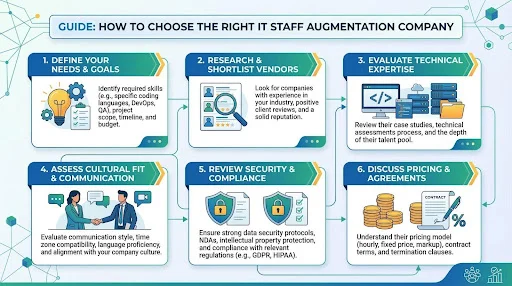
Technical expertise is one of the most important factors when selecting an IT staff augmentation company The professionals they provide will become part of your development team so their skills must match your expectations
This guide will make you know how to select the appropriate IT staff augmentation company to do business with.
Understand Your Project Requirements
You should have defined your project requirements before seeking the services of a staff augmentation provider. Before you call upon vendors, you must be very clear of what you need to accomplish. There is a common mistake where many businesses call upon vendors without having a clear idea of what they need.
First you need to figure out what kind of help you need for your project. For example you might need people who’re good at making software or people who know about clouds and computers or people who are experts, these are the core competencies. Once you’ve identified the technical skills, next determine how long you will need these professionals and whether the project is short-term or long-term.
You should also consider the level of experience required Some projects need senior engineers, while others can be completed by mid level developers When your requirements are clear it becomes easier to evaluate potential staff augmentation providers
Evaluate Technical Expertise
Look for companies that have experience in the technologies you are using This may include programming languages frameworks cloud platforms and development tools For example if your project uses Python React or AWS the company should have specialists who are already experienced in these technologies
You should also review the company portfolio case studies or past projects This will give you an idea of their technical capabilities and the types of businesses they have worked with before
Check Industry Experience
Industry experience is another important factor A company that has worked with businesses in your industry will better understand your challenges and requirements
For example if your company operates in healthcare finance or ecommerce the development team must understand the standards and compliance requirements related to that industry This knowledge can help prevent costly mistakes during development
Working with a company that understands your industry also improves communication because they are already familiar with common workflows and business processes
Review the Hiring and Screening Process
An IT staff augmentation company should also be equipped with a good hiring and screening process This will guarantee that the professionals they offer are experienced skilled and with the capability to work with international teams.
What the company wants to know is how they screen developers and engineers before including them into their talent pool Good providers tend to test coders, engineers on coding and interviews and background checks.
You also want to enquire whether you can interview the candidates prior to their joining your team This is in order to ascertain their capabilities as well as to determine whether or not they will be able to fit into your culture.
Consider Communication and Collaboration
In effective remote working When augmented personnel are collaborating with your own team they should communicate effectively.
Select a business that values communication and employs new collaboration technology This could be project management software messaging applications and video conferencing software.
Time zone compatibility is the third aspect to be considered Some companies offer professionals who may change their working hours according to your schedule This will help the teamwork easier and will make the projects less delayed.
Review Flexibility and Scalability
Flexibility One of the chief benefits of staff augmentation is flexibility Your company of choice must enable you to increase or decrease your team in accordance with your project requirements.
To give an example you might require two developers at the start of an application but then five or six engineers in the development stage A good staff augmentation company must be able to muster qualified expertise unusual within a short period as required.
Inflexibility also contains the contract terms engagement models and the possibility to substitute the team members in case of necessity.
Review Client Feedback and Reputation
Client reviews and testimonials provide valuable insights into the reliability of a company Look for feedback from past clients on trusted review platforms business directories or case studies published by the company
Pay attention to comments related to professionalism communication project delivery and developer quality A company with consistently positive feedback is more likely to provide a good experience
You can also ask the company to share references from previous clients Speaking directly with past customers can give you a clearer understanding of how the company works
Compare Pricing and Value
Cost is never a small thing to keep in mind, it is however not the only determinant in your choice The cheapest will not necessarily give the best results.
Rather than just considering price alone analyse value you get Look at the level of developers experience and project management support and the degree of reliability.
An effective staff augmentation partner must offer open prices and no additional expenses behind the scenes Clear deals prevent cases of misunderstanding and good working relationship.
Final Thoughts
Identifying the appropriate IT staff augmentation firm may have a considerable effect on the effectiveness of your technology projects The appropriate partner is one that offers experienced professionals enhances the rate of development and assists your company to remain competitive in an ever-evolving digital world.
Defining your needs perceiving technical expertise screening of hiring practices and scrutiny of client reviews you can be assured of an effective partner When you select the right company staff augmentation becomes a potent tool that would aid your business to expand at a higher rate and being at the same time flexible.

MyKaty Cloud: Customizing Your Personal Learning Hub for Maximum Productivity

Itchko Ezratti Net Worth: Inside the Wealth, Impact, and Real Estate Empire of the GL Homes Founder

Demetris Fenwick: Inside the Journey of a Modern Boxer Blending Skill, Discipline, and Influence

Make an Impression: Using Custom Printed Shrink Sleeves To Stand Out

Secure Your Future: Effective Risk Management Solutions for Modern Business
-

 General6 months ago
Felixing: A Philosophy of Turning Simple Ideas into Wonders
-

 Health6 months ago
Lufanest: Effective Local Anesthesia with Fewer Risks
-

 Entertainment5 months ago
هنتاوي.com: Your Gateway to Arabic Anime Content
-

 General7 months ago
bardoek: The Artistic Heritage Inspiring Modern Creative Trends
-

 General6 months ago
Discover Anonib AZN: An Anonymous Asian Forum
-

 Fashion7 months ago
fashionisk .com – Your Ultimate Guide to Trendy, Smart Fashion
-

 Lifestyle7 months ago
Mariano Iduba: A Visionary Leader in Global Digital Growth
-

 General5 months ago
Euroyungs com Explained: Multi-Niche Hub or Risky Site?